

WebWork Time Tracker: The Middle Ground Between Trust and Visibility
Let’s be direct.
A lot of time tracking software misses the mark. Some tools are so basic they give you numbers without context. Others feel so invasive that teams start working with anxiety instead of focus. Most businesses don’t need “more surveillance” or “just a timer”. They need a practical middle ground: real visibility without damaging trust.
That’s the gap Vahagn Sargsyan ran into back in 2016.
He was running a web development company and needed a clean way to show international clients proof of work. On paper, it sounds simple: clock in, clock out, send timesheets.
In reality, it was messy.
Many tools he tested were either too light to build client confidence, or so heavy they made employees feel micromanaged. The simple ones counted hours but didn’t give enough detail to prove meaningful progress. The extreme ones tracked everything and created resentment fast. Clients doubted the “light” tools. Teams hated the “heavy” tools. Nobody won.
So Sargsyan built his own internal solution.
That side project became WebWork Time Tracker, now used by 26,000+ companies across 160 countries, and still bootstrapped with no outside investors. That matters because the product roadmap stays tied to users, not fundraising pressure.
What Actually Makes WebWork Different
In a crowded time-tracking market, a lot of platforms look identical on the surface. Start timer. Stop timer. Export report. Done.
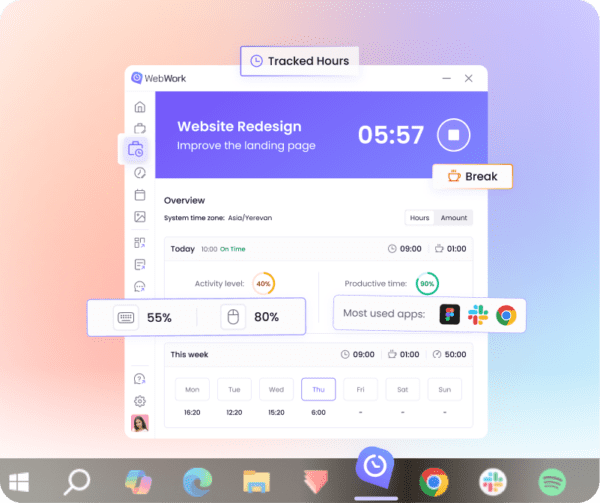
WebWork is built more like an operations layer for remote and hybrid teams: ? Automated time capture (no constant manual toggling)
? Optional screenshots (with control to blur/skip based on team policy) ? App + website activity tracking for work context
? Real-time dashboards showing online status, project allocation, and trends ? Payroll and invoice readiness without stitching together multiple systems
The goal is not to overwhelm you with raw data. It’s to make the work legible and easier to manage.
The AI Layer (When It’s Actually Useful)
“AI” is everywhere right now, but most implementations are either cosmetic or noisy. WebWork’s AI is positioned more as a signal detector, not a gimmick. Example use cases:
? Burnout risk flags when someone’s workload patterns show sustained overtime
? Behavior pattern shifts when someone suddenly works unusual hours, jumps across projects, or shows sharp productivity dips
? Operational prompts that help managers notice issues early and act before they become team-wide problems
Instead of just showing activity graphs, it nudges managers toward decisions.
Real-World Outcomes (Why Teams Switch) Companies typically change tracking systems for one of two reasons:
1. admin overhead is killing them
2. visibility is weak and trust breaks under client pressure
Some examples highlighted by WebWork’s customer outcomes include: ? Reduced administrative time spent on billing and tracking
? Fewer payroll disputes because reporting becomes consistent and system-based ? Better clarity in remote oversight without requiring constant check-ins ? Lower tooling costs when multiple workflows consolidate into one platform
The core theme is the same: visibility improves, and unnecessary friction drops.
Pricing That Makes the Switch Easier
Time tracking with monitoring, reporting, and operational workflows often becomes expensive fast.
WebWork’s pricing is positioned far below many competitors, while keeping the core feature set accessible. The idea is simple: teams should be able to test and adopt without a long procurement cycle.
There’s also a 14-day free trial with full access so teams can validate fit before committing.
Practical Features Teams Actually Use
WebWork covers the expected set: time tracking, optional screenshots, activity tracking, reporting.
But teams often value the less-flashy operational features:
? Workload + work-life balance signals (to reduce burnout drift)
? GPS tracking for field teams (when needed)
? Shift scheduling across time zones
? Project budgeting alerts to avoid silent overruns
? Payments support and invoicing readiness
? Deep configurability, so companies can set policies that match culture (not a one-size surveillance model)
The key is control: the platform is configurable based on what a team considers reasonable.
Trust vs Visibility: The Actual Problem WebWork Solves Managing remote or hybrid teams comes down to two needs:
? Visibility: so leaders can manage output, timelines, budgets, and client expectations ? Trust: so employees don’t feel treated like suspects
Old-school monitoring tools often maximize visibility and destroy trust.
Basic timers protect trust but leave leaders blind when client accountability is required.
WebWork aims to sit in the middle: enough visibility to run operations cleanly, without turning work into a surveillance environment.
As Sargsyan has said in interviews, the goal is getting the right metrics, not more metrics. Many time tracking platforms simply dump spreadsheets of data and call it insight. WebWork’s approach is built to turn patterns into actions.
Security and Integrations (Without the Buzzword Parade)
WebWork supports common security and compliance standards (including GDPR/CCPA/HIPAA alignment), along with encryption and access controls.
It also integrates with tools teams already use, including project management and collaboration platforms, so adoption doesn’t require workflow disruption.
The Bottom Line
Time tracking should not be a constant fight between managers and teams. It should help you:
? track time accurately
? provide proof of work when needed
? reduce admin overhead
? improve decisions with real operational signals
? and keep trust intact
WebWork Time Tracker is built for that middle ground: trust and visibility, without overcomplicating the system. Try WebWork Time Tracker: https://www.webwork-tracker.com/